
Premium Blogger Theme Documentation
Thank you for purchasing our Premium Blogger XML Theme. This theme is designed for modern blogs, online tools, PDF editors, and content-focused websites. It combines a clean user interface, responsive layout, dark mode support, and built-in monetization areas.
This documentation explains every feature step-by-step so even beginners can set up the theme without technical support.
System Requirements
- Active Blogger (Blogspot) account
- Access to Blogger Theme section
- Modern web browser (Chrome, Edge, Firefox)
- JavaScript enabled
Theme Installation
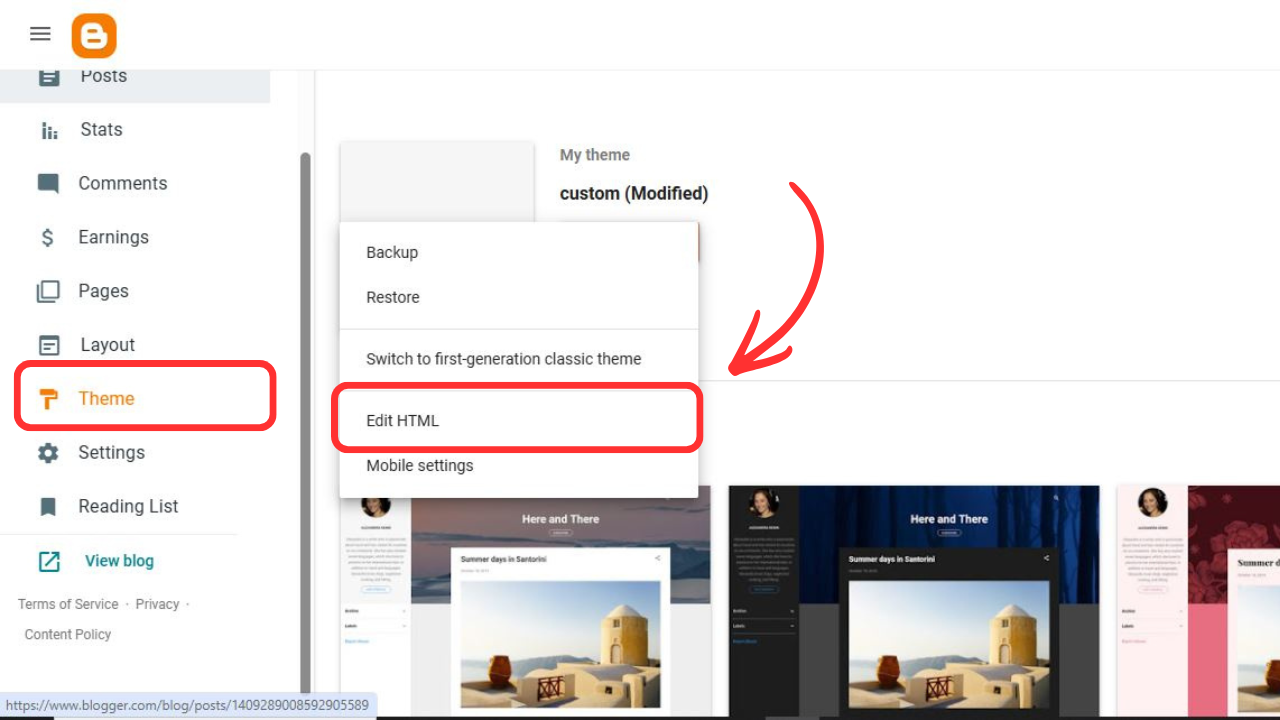
Step 1: Backup Existing Theme
- Login to Blogger Dashboard
- Go to Theme
- Click Backup / Restore
- Download your current theme
Step 2: Upload XML File
- Open Theme → Restore
- Click Upload
- Select
index.xml - Confirm upload
Layout Structure & Widgets
The theme uses Blogger’s default layout system but with pre-designed widget areas for better control.
Main Sections
- Header (Logo, Menu, Dark Mode)
- Hero Search Section
- Main Content Area
- Sidebar Widgets
- Footer Widgets
[Blogger Layout Image Here]
Theme Options & Features
- Responsive Grid Layout
- Sticky Header & Sidebar
- Ajax-style search UI
- Card-based post design
- Tool-ready interface (PDF tools)
Dark Mode / Light Mode
The theme includes built-in Dark Mode using CSS variables. Users can toggle between modes using the header button.
- Automatic color switching
- Preference saved in browser
- No external libraries
Advertisement Management
The theme includes multiple predefined ad slots.
| Ad Slot | Location |
|---|---|
| Top Banner | Above content |
| Sidebar Ads | Sticky left & right |
| Footer Ads | Bottom of site |
Labels & Shortcodes
Use Blogger labels to control layout behavior.
featured– Highlighted poststool– Tool-based pagesslider– Homepage slider items
SEO & Performance
- Clean HTML5 structure
- Fast loading fonts
- Mobile-first CSS
- Optimized for Core Web Vitals
License Verification (Required)
After installation, verify your purchase code to activate all features.
Verification URL:
https://premadecodes.com/verify-license
Credits & Licensing
- Google Fonts
- Font Awesome Icons
- Custom JavaScript
- Premade Codes License System
Frequently Asked Questions
Q: Can I use this theme on multiple sites?
A: No. One license = one website.
Q: Can I edit the XML?
A: Yes, but only if you understand Blogger XML.